Positioning within the Figma AI ecosystem
With the AI Agent, Figma expands its AI offering with another application. Alongside the agent, there are already tools like Figma Make and the Figma MCP Server, each serving different purposes.
Figma Make allows users to create interactive prototypes and functional interfaces from prompts or existing designs. Its focus is on quickly turning ideas into clickable concepts or initial applications.
The Figma MCP Server enables external AI systems such as Claude to access information from Figma files. This allows designs to be analyzed, described, or used for further tasks within AI-driven workflows.
In contrast, the Figma AI Agent is designed for working directly within existing files. It can generate and evolve designs, but its real strength lies in organizing design systems, maintaining components, and handling other repetitive tasks in day-to-day design work. It can also assist with tasks such as design reviews or creating similar variants based on existing designs.
Use cases
For the following tests, the prompts were intentionally written in English. Figma currently recommends using English prompts, as the underlying models are primarily trained on English input and therefore deliver the most reliable results.
Organizing and standardizing design systems
Consistent component naming
Anyone who has worked with a growing design system will be familiar with this problem: components are created, extended, and maintained by different people. As a result, naming conventions often become inconsistent.
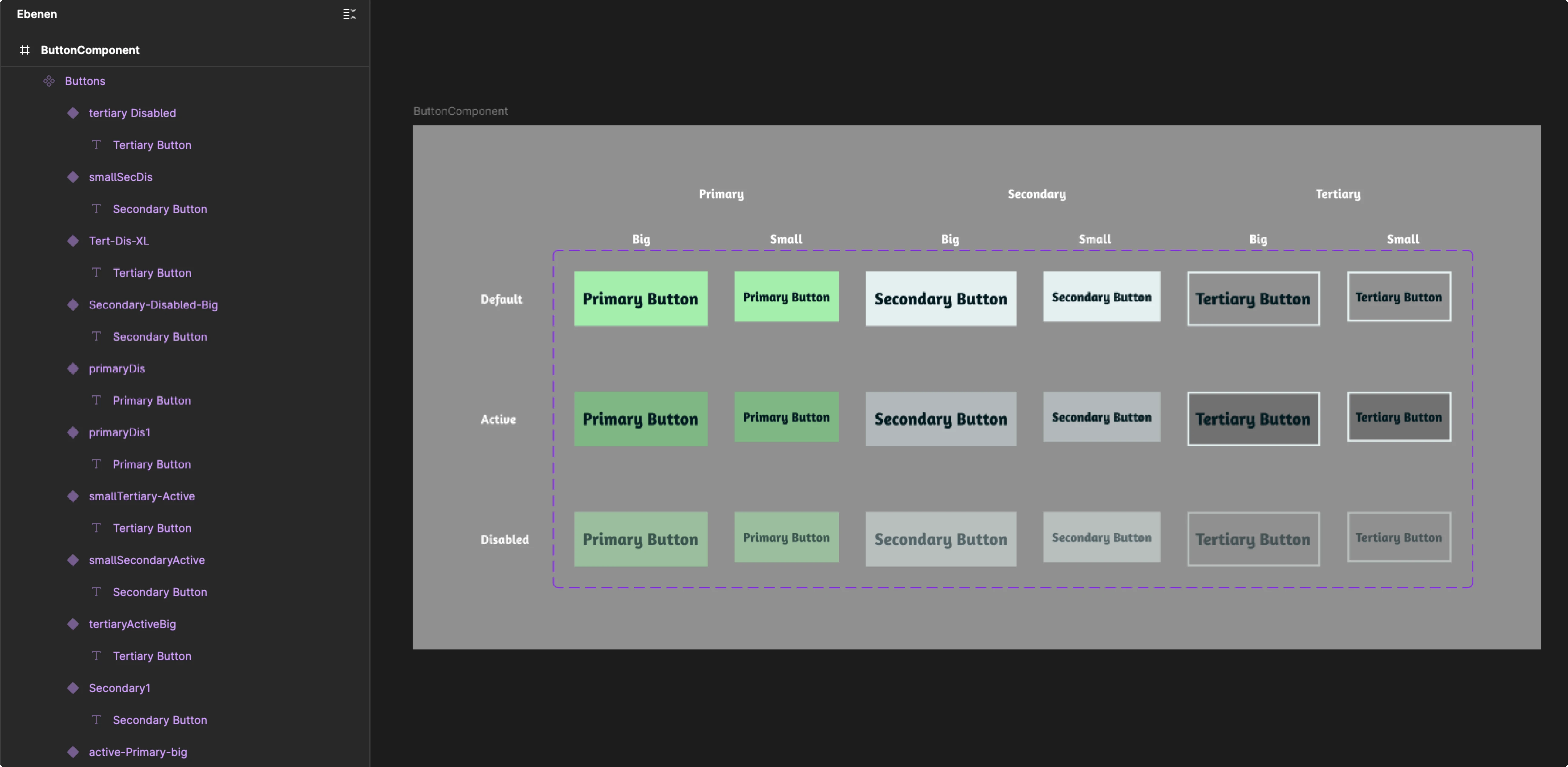
Figure 1: Inconsistent naming of button components
Prompt:
Rename all button components using a consistent naming convention. Use the format: Button / Type / State / Size
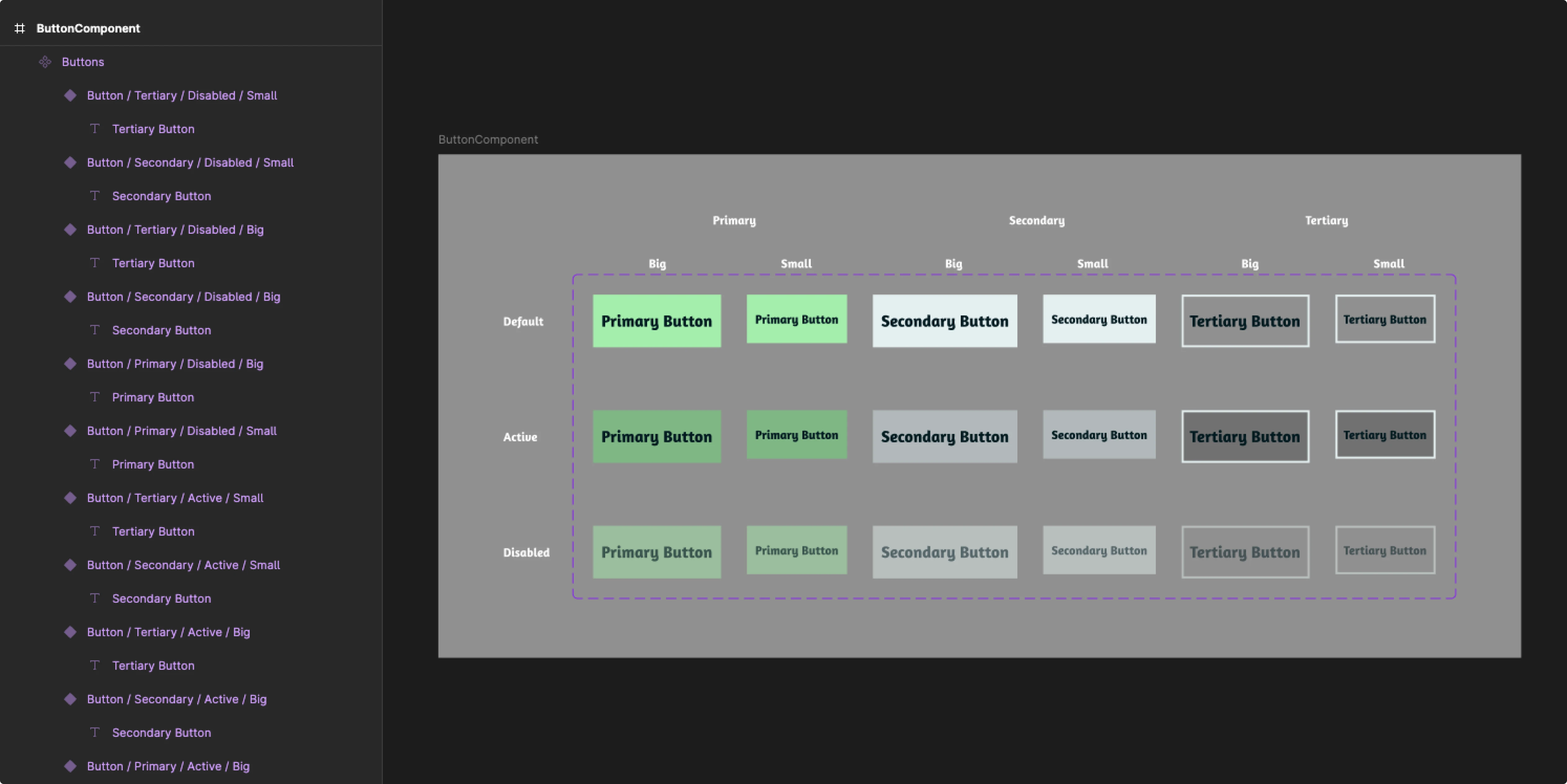
Figure 2: Standardized naming created by the AI Agent
In testing, the renaming worked without any visible errors. Even though the components were intentionally named inconsistently, the agent correctly identified different button types, sizes, and states, and translated them into a consistent naming structure. It likely helped that the underlying structure of the button system was already clearly recognizable.
Structuring components and creating properties
Structured component sets significantly improve working with design systems. Instead of managing numerous individual components, variants can be organized using properties such as type, size, or state.
Prompt:
Organize these button components into a component set with properties for Type, State and Size.
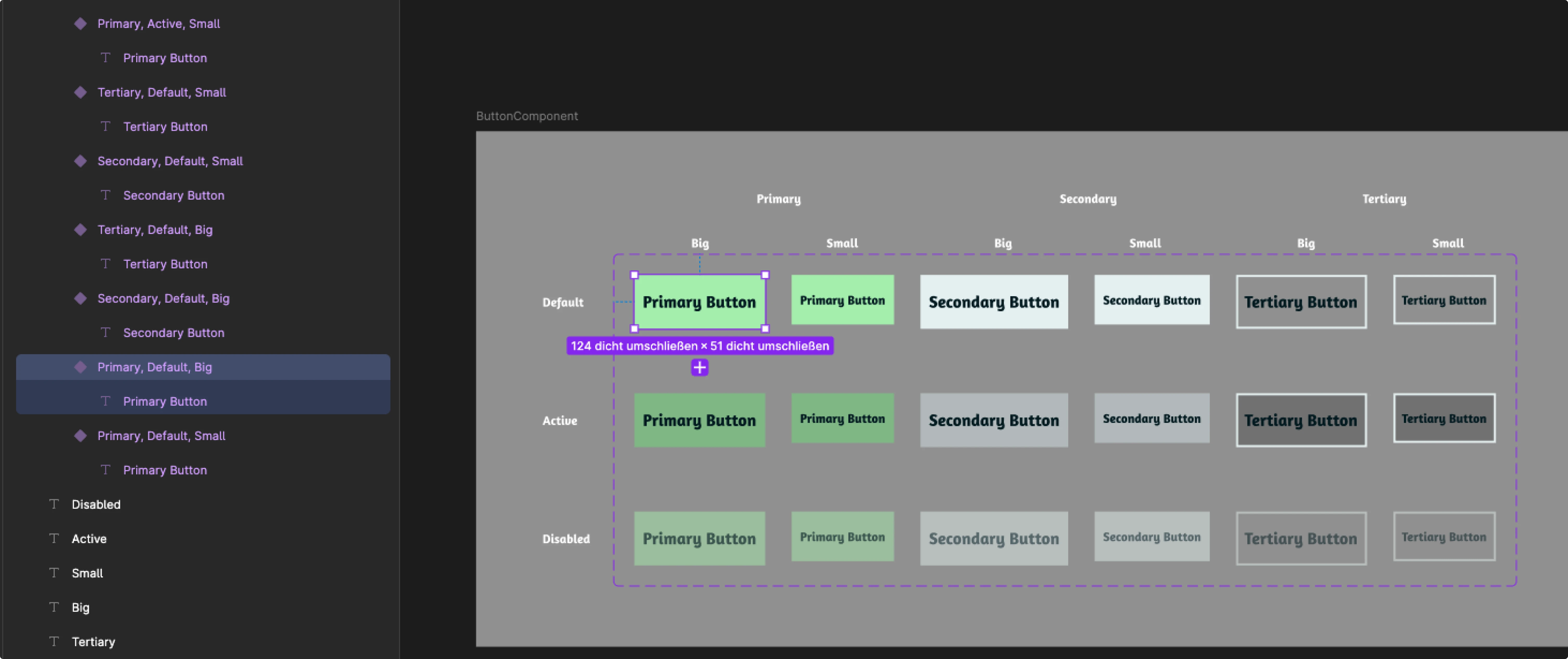
Figure 3: Automatically structured button variants with properties
What stood out was how reliably this step worked. The agent recognized the existing attributes of the components and created the appropriate properties from them. Within seconds, a collection of individual components was transformed into a structured component set with clearly defined variants. Since restructuring existing components is usually associated with a lot of manual effort, this example was one of the most convincing results in the hands-on test.
Maintaining and documenting design systems
In addition to organizational tasks, the AI Agent can also support the maintenance of design systems.
Prompt:
Set the border radius of all button components to the variable "cornerRadiusM".
In this example, an existing border radius variable was applied to all button components. Instead of adjusting each component individually, the agent applied the change directly across all selected elements. In larger design systems with many variants, this can save a noticeable amount of time.
Documentation is another task that often gets neglected in day-to-day project work, even though it is essential for the long-term maintainability of a design system.
Prompt:
Create documentation for this button component set.
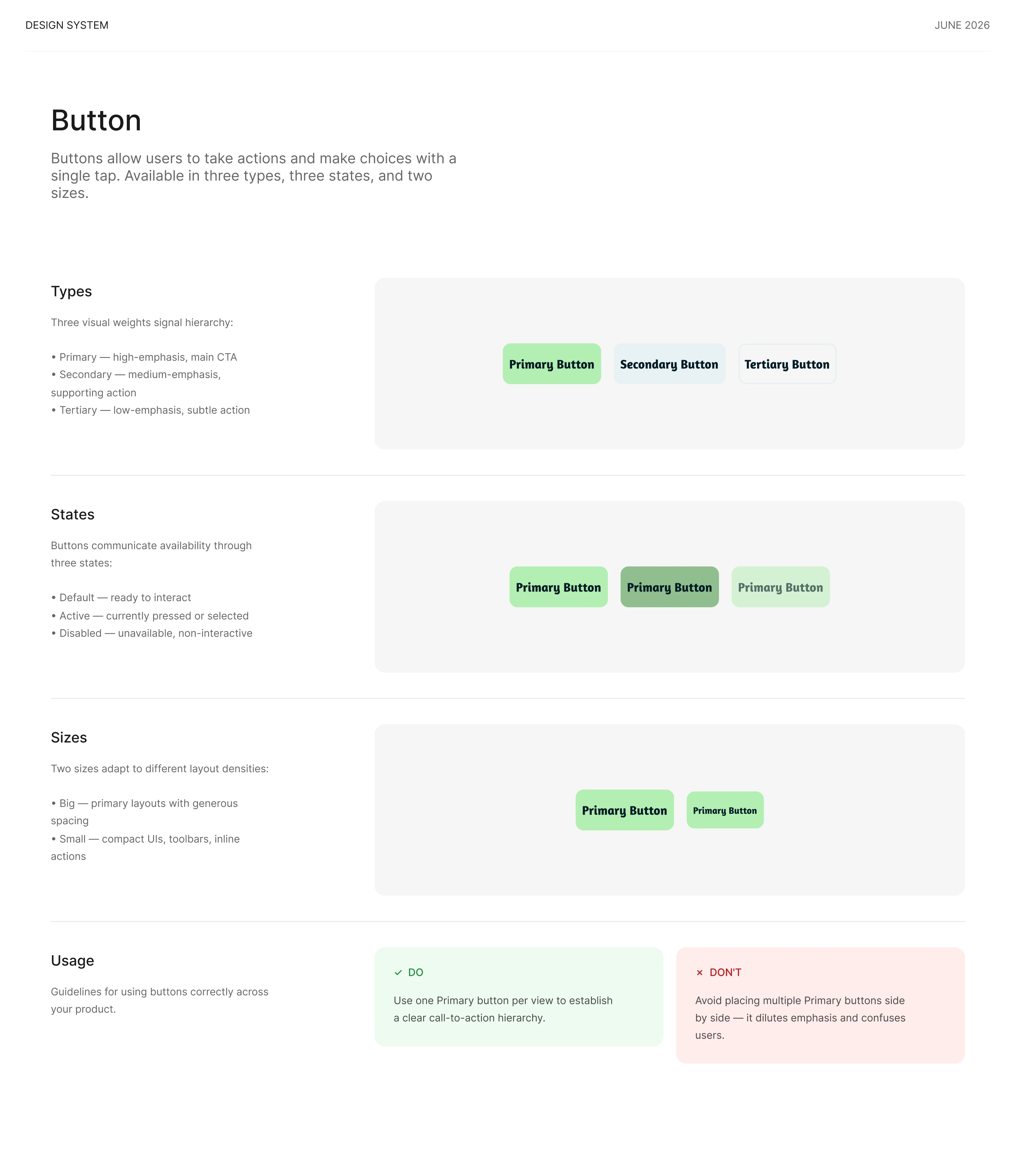
Figure 4: Generated documentation for the button component system
The agent analyzed the resulting button system and generated descriptions for the different variants. For relatively simple button components, this already worked surprisingly well, and the properties were correctly identified. However, how useful this feature will be in practice will become more apparent with more complex components. What matters here is not only the quality of the descriptions, but also how well they can be integrated into existing documentation structures and design systems.
Filling placeholders with relevant content
Generating content and images for mockups
Empty placeholders are a common part of early mockups. At the same time, designs with realistic content are often much easier for stakeholders and teams to understand.
In this example, several destination cards with placeholders were created, and the agent was first asked to generate suitable descriptions for backpackers.
Prompt:
Create a two-sentence travel description for each destination card in german that fits inside the cards. The content should target backpackers and young travelers. Keep the descriptions concise and suitable for travel destination cards.
The image placeholders were then automatically filled with matching images.
Prompt:
Fill all image placeholders with matching travel photography based on the destination and card content.
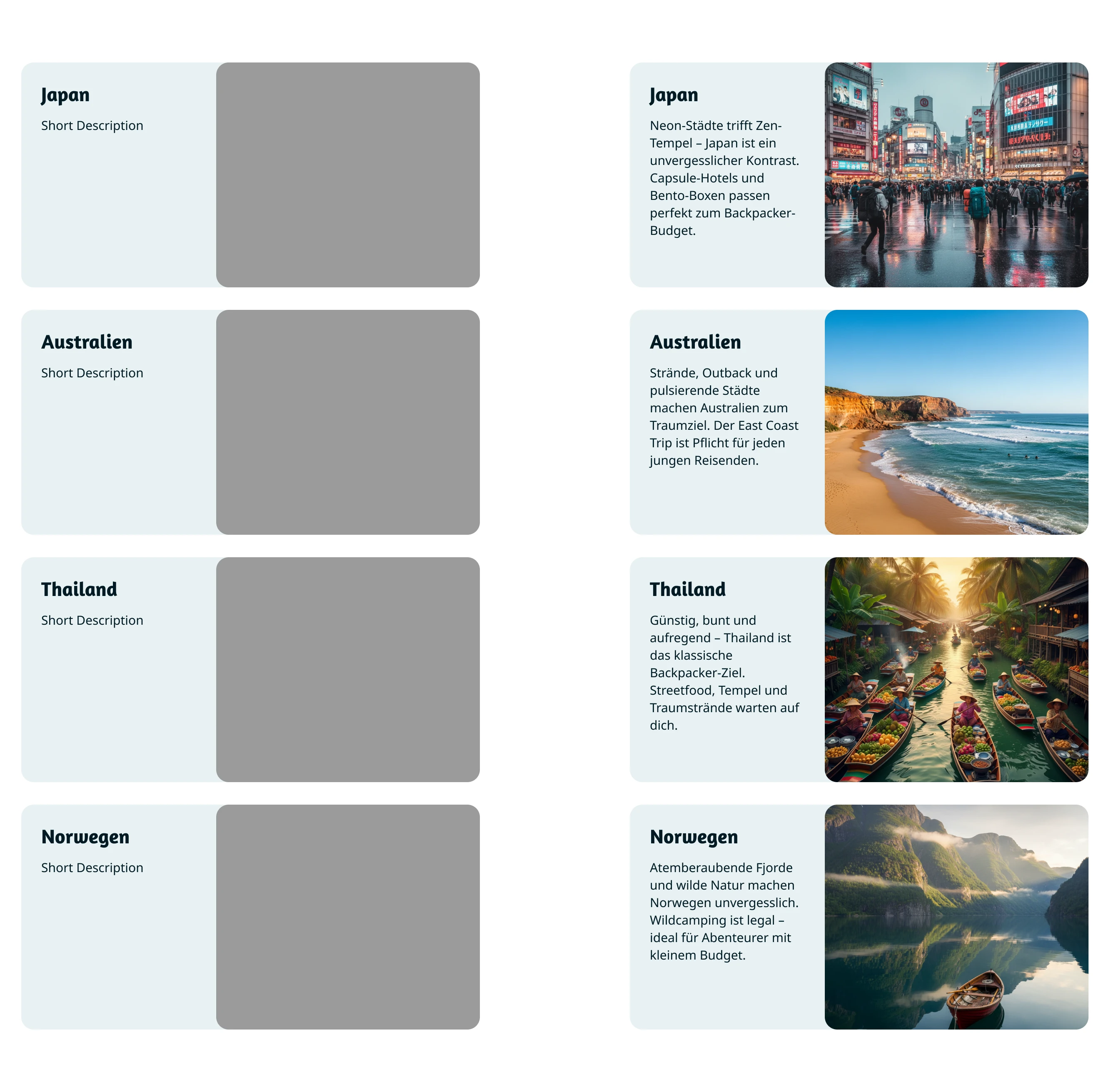
Figure 5: Empty components compared to automatically filled travel cards
One practical advantage was that both text and images were generated directly within Figma. Instead of switching between different tools, placeholders could be filled directly within the existing design. The agent took into account factors such as available text length, card content, and the specific destination. The results generally matched the context and made the mockups much more tangible. Both the texts and the image selection clearly reflected the defined target audience. However, the quality was usually not sufficient for final content: the texts sometimes felt generic and resembled typical marketing copy, while the images often had the character of sample or stock photos. Still, for early mockups, prototypes, and concept phases, the agent provides a solid starting point and can significantly speed up the creation of sample content.
Adapting content for a different target audience
In the design process, content often needs to be adapted for different audiences. What appeals to backpackers does not necessarily resonate with luxury travelers.
Prompt:
Rewrite the destination card content for a luxury travel audience. Focus on exclusive experiences, premium accommodations and comfort. Keep the destinations, structure and length of the existing content. Also adjust the images accordingly.
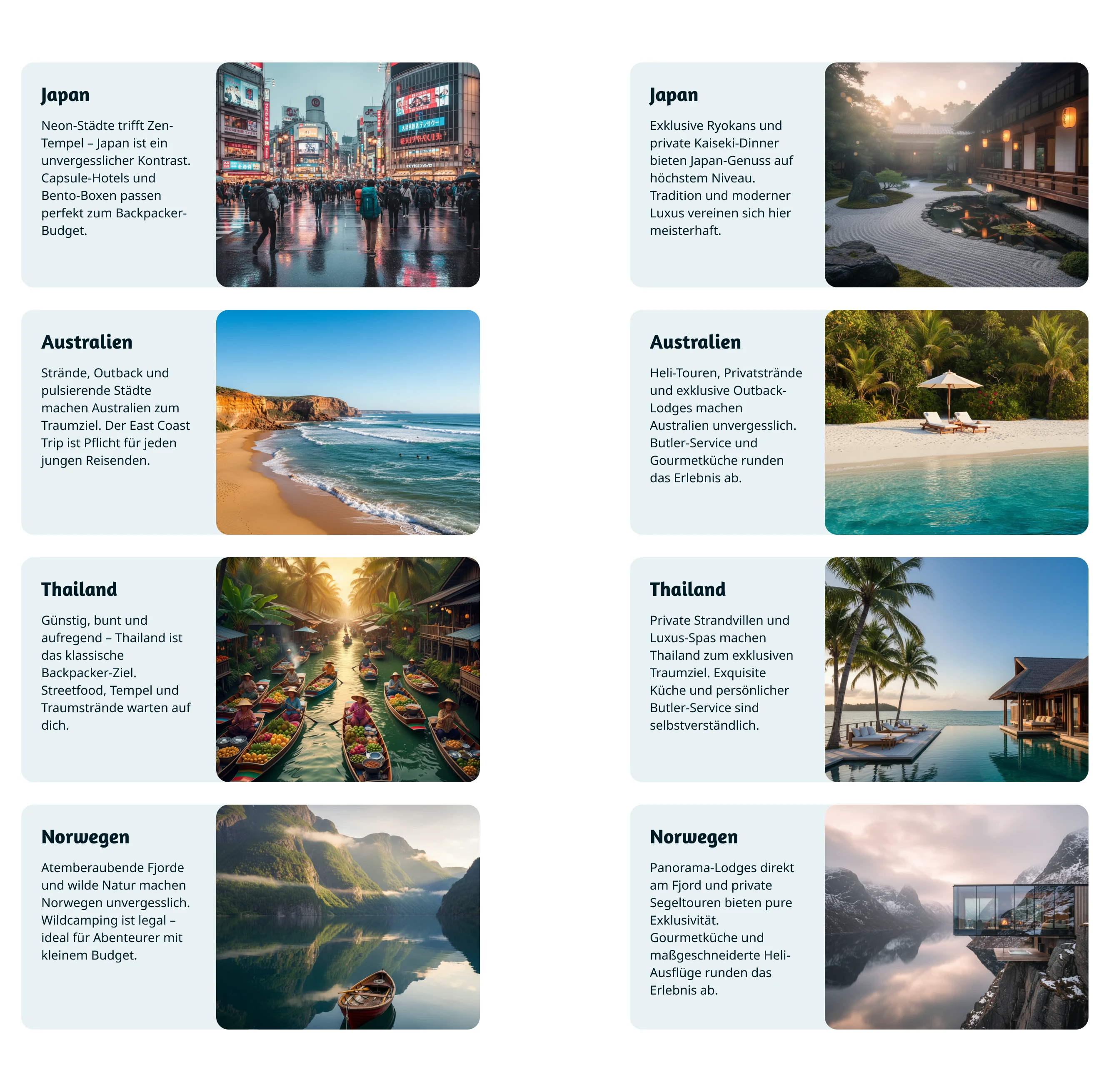
Figure 6: Adapting content for different target audiences
What was particularly interesting in this example was that the agent did not simply rephrase the existing content. Instead of focusing on adventure and budget accommodations, the emphasis shifted to exclusive experiences, high-end hotels, and comfort. At the same time, the structure, length, and core message of each card remained intact. The image selection was also adapted to the new audience. Within seconds, a backpacker-focused travel overview was transformed into a version for luxury travelers without manually replacing content or images.
Conclusion
After the first tests with the Figma AI Agent, what stood out most was how reliably many tasks already work. Especially when working with design systems, it quickly became clear how much time can be saved.
The most convincing features were those related to organizing and maintaining design systems. Renaming components, identifying properties, and applying changes across multiple elements worked surprisingly well and saved noticeable time.
For generative tasks, the picture was more mixed. Both the generated texts and the image suggestions generally fit the context and helped quickly populate mockups with content. At the same time, the results often felt generic and required further refinement.
As with other AI systems, results heavily depend on how prompts are formulated. The more precise the instructions, the more reliable the outcome. This becomes especially relevant when individual actions consume AI credits (as of June 2026). It also became clear that the agent does not always produce the desired result on the first attempt, and some actions can take noticeable time. At the same time, the test showed that the agent’s capabilities go far beyond the examples covered here. With continued use, new use cases keep emerging, often directly within the design process itself. Since changes can be undone at any time, experimenting remains relatively low-risk.
At the moment, the greatest value lies in accelerating repetitive and organizational tasks. This leaves more time for core UX challenges: understanding user needs, developing concepts, and making well-founded design decisions – areas where the expertise of designers makes the biggest difference.
More articles from our blog